Store Detail Page
What this section does
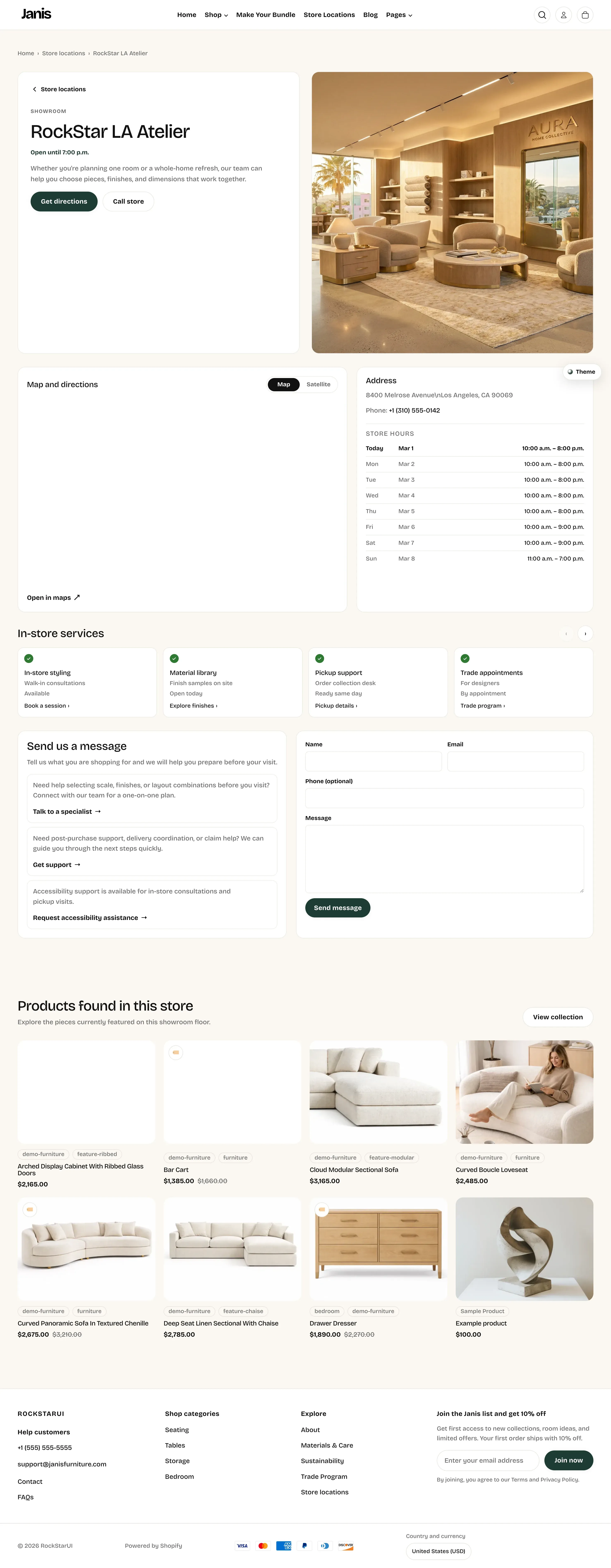
Section titled “What this section does”The Store Detail Page template is the dedicated page for a single showroom. It combines:
- Hero details (store title, status, intro, image, directions, call button).
- Map and satellite toggle with address and hours panel.
- In-store services cards.
- Support/contact content and contact form.
- A product grid section for items featured in that store.
How to add a new store detail page
Section titled “How to add a new store detail page”- Go to Online Store -> Pages.
- Click Add page.
- Set the page title (for example,
RockStar Austin Studio). - In the template selector, choose page.store-location-detail.
- Save the page.
- Go to Online Store -> Themes -> Customize.
- Open your new page and configure section settings and blocks.
- Save.
Connect it from Store Locations
Section titled “Connect it from Store Locations”After the dedicated page exists, connect it from the Store Locations list:
- Open the page using template page.store-locations.
- Select the relevant Store block.
- Set Store details page URL to your new page.
- Save and test the View store details button on storefront.
Editor areas overview
Section titled “Editor areas overview”- Left sidebar:
- Main section: Page - store detail.
- Blocks: Service, Store hour row, Support row.
- Section below: Store location products.
- Center preview:
- Shows hero, map/hours, services, support + contact form, and product grid.
- Right settings panel:
- Page-level controls (labels, links, map text, contact copy).
- Block-level controls (services, hours rows, support rows).
Key settings (Page - store detail)
Section titled “Key settings (Page - store detail)”Important controls used most often:
- Back label / Back link: top breadcrumb + back action to Store Locations page.
- Store title / Status line: primary identity and open-hours summary text in hero.
- Storefront image: large visual in hero.
- Address heading / Address lines / Phone value / Maps link URL: visit info panel + map links.
- Map heading / Map view label / Satellite view label: map module text.
- Directions button label / Call store label: hero action buttons.
- Services heading: title above service cards.
- Contact form heading / Contact form intro / Contact submit label: form area copy.
Block settings
Section titled “Block settings”Service block
Section titled “Service block”- Title
- Subtitle
- Availability text
- Link label
- Link URL
Store hour row block
Section titled “Store hour row block”- Highlight as today
- Day
- Date
- Hours
Support row block
Section titled “Support row block”- Text
- Link label
- Link URL
Modify an existing store page
Section titled “Modify an existing store page”Update hero + visit info
Section titled “Update hero + visit info”- Open that specific store page in Theme Editor.
- Edit store title, status line, image, address, phone, maps link.
- Save and verify on storefront.
Update hours quickly
Section titled “Update hours quickly”- Edit Store hour row blocks.
- Set Highlight as today on the current day row.
- Save and check the hours panel.
Update services/support
Section titled “Update services/support”- Add/remove/reorder Service and Support row blocks.
- Keep titles short for card layout balance.
- Save and verify desktop + mobile wrapping.
Products found in this store (bottom section)
Section titled “Products found in this store (bottom section)”The Store location products section is configured separately on the same page.
Key settings:
- Heading
- Subheading
- Fallback collection
- Products to show
- CTA label
- CTA link
Product source order used by the theme:
custom.store_productsmetafield list.custom.store_collectionmetafield.- Section fallback collection.
- Inferred collection handles (
store-[page-handle]then[page-handle]).
Advanced setup with metafields (optional)
Section titled “Advanced setup with metafields (optional)”For teams managing many stores, page metafields can override section defaults per store page. Key row-based metafields:
custom.store_services_rowscustom.store_hours_rowscustom.store_support_rows
Each row uses | separators in one line per entry.
Important behavior
Section titled “Important behavior”- If Back link is blank, it falls back to
/pages/store-locations. - If Phone URL override is blank, the theme auto-builds a
tel:link from phone value. - If Maps link URL is blank, the theme generates one from store address/title.
- For known store handles, the theme can inject fallback title/address/image data.
- If row metafields are present, they take precedence over section blocks for services/hours/support rendering.
Why is my map pin wrong?
Section titled “Why is my map pin wrong?”The map query is built from address/title unless a specific maps URL is provided. Update address data or set Maps link URL explicitly.
Why is the wrong store title showing?
Section titled “Why is the wrong store title showing?”A page metafield or handle-based fallback may be overriding section settings. Check page metafields first.
Why are my Service blocks not appearing?
Section titled “Why are my Service blocks not appearing?”If custom.store_services_rows exists on the page, row metafield data is used instead of Service blocks.
Why does View store details open a different store page?
Section titled “Why does View store details open a different store page?”The Store Locations block may point to an old details URL. Re-open page.store-locations and update Store details page URL.
Related guides
Section titled “Related guides”Publish checklist
Section titled “Publish checklist”- Page template is
page.store-location-detail. - Hero content matches the actual showroom.
- Hours and today-row highlight are correct.
- Map, directions link, and call link are valid.
- Services/support links are valid.
- Products section shows the expected assortment.
- Store Locations page points to this detail page.
Need help?
Section titled “Need help?”If you still need help, contact support via the Contact page.