Help Center
What this section does
Section titled “What this section does”The Help Center section adds a two-column support area with intro copy, optional CTA, and an FAQ accordion. It is designed to answer common pre-sale and post-purchase questions directly on the homepage.
How to set it up
Section titled “How to set it up”- Go to Online Store -> Themes.
- Click Customize.
- Open the Home page template.
- In the left sidebar, select Help center.
- Configure section settings and FAQ blocks, then save.
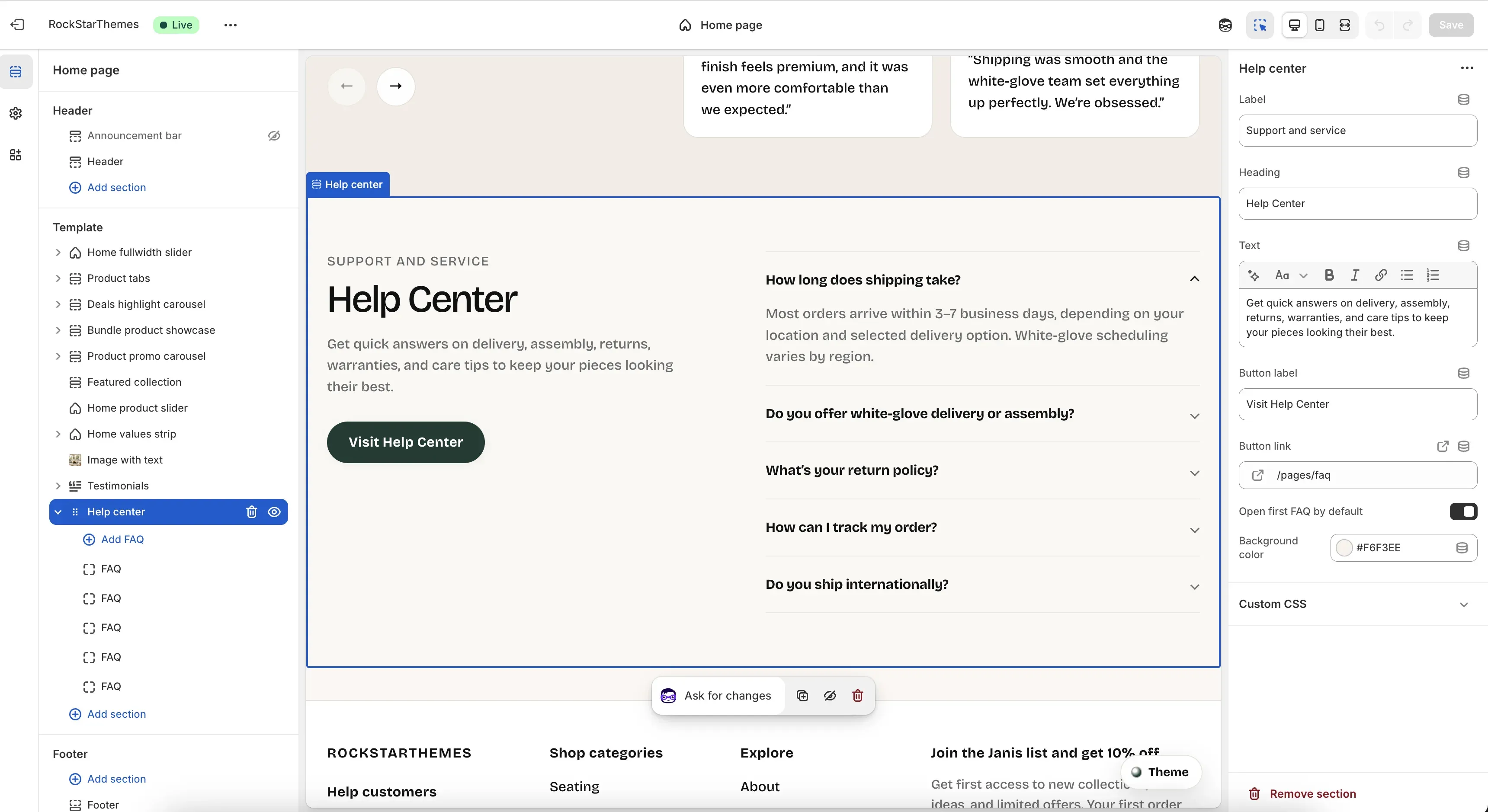
Editor areas overview
Section titled “Editor areas overview”- Left sidebar:
- Shows the Help center section and each FAQ block.
- Add FAQ creates a new question/answer item.
- Drag blocks to reorder FAQ items.
- Center preview:
- Shows left intro content and right accordion list.
- Reflects open/closed state and copy updates immediately.
- Right settings panel:
- Section settings: Label, Heading, Text, Button label, Button link, Open first FAQ by default, Background color.
- Block settings appear when a specific FAQ block is selected.
Key section settings explained
Section titled “Key section settings explained”- Label: small uppercase intro line above heading.
- Heading: main support title.
- Text: rich text description under heading.
- Button label: CTA text.
- Button link: CTA destination URL.
- Open first FAQ by default: keeps first FAQ item expanded on load.
- Background color: section background tone.
FAQ block settings
Section titled “FAQ block settings”Each FAQ block includes:
- Question: accordion title row.
- Answer: rich text answer shown when expanded.
Important behavior
Section titled “Important behavior”- If Button label is empty, no CTA button is rendered.
- If Button label is set and Button link is empty, CTA falls back to
/pages/faq. - If Open first FAQ by default is enabled, only the first item starts opened.
- FAQ order follows block order in the left sidebar.
Common tasks
Section titled “Common tasks”Add a new FAQ item
Section titled “Add a new FAQ item”- Select Help center.
- Click Add FAQ.
- Set question and answer.
- Save.
Reorder FAQ priority
Section titled “Reorder FAQ priority”- Drag FAQ blocks in the left sidebar.
- Put highest-priority questions first.
- Save.
Keep all items collapsed by default
Section titled “Keep all items collapsed by default”- Open section settings.
- Disable Open first FAQ by default.
- Save.
- Keep questions concise and action-oriented.
- Use short, direct answers and link deeper policies from the CTA destination.
- Place delivery, returns, and tracking questions near the top.
- Validate accordion readability on mobile after long-answer edits.
Why is the button missing?
Section titled “Why is the button missing?”The button only appears when Button label contains text.
Why does the button still open a page when button link is empty?
Section titled “Why does the button still open a page when button link is empty?”The section uses /pages/faq as the default link fallback.
Why is the first FAQ already open?
Section titled “Why is the first FAQ already open?”The Open first FAQ by default setting is enabled.
Related guides
Section titled “Related guides”- Testimonials Documentation
- Image With Text Documentation
- Home Values Strip Documentation
- Theme Documentation
Publish checklist
Section titled “Publish checklist”- Confirm label/heading/text copy.
- Confirm FAQ order and wording.
- Verify CTA label/link behavior.
- Verify first-item open state setting.
- Save and publish.
Need help?
Section titled “Need help?”If you still need help, contact support via the Contact page.