Tickets Inbox + Create Ticket (L2)
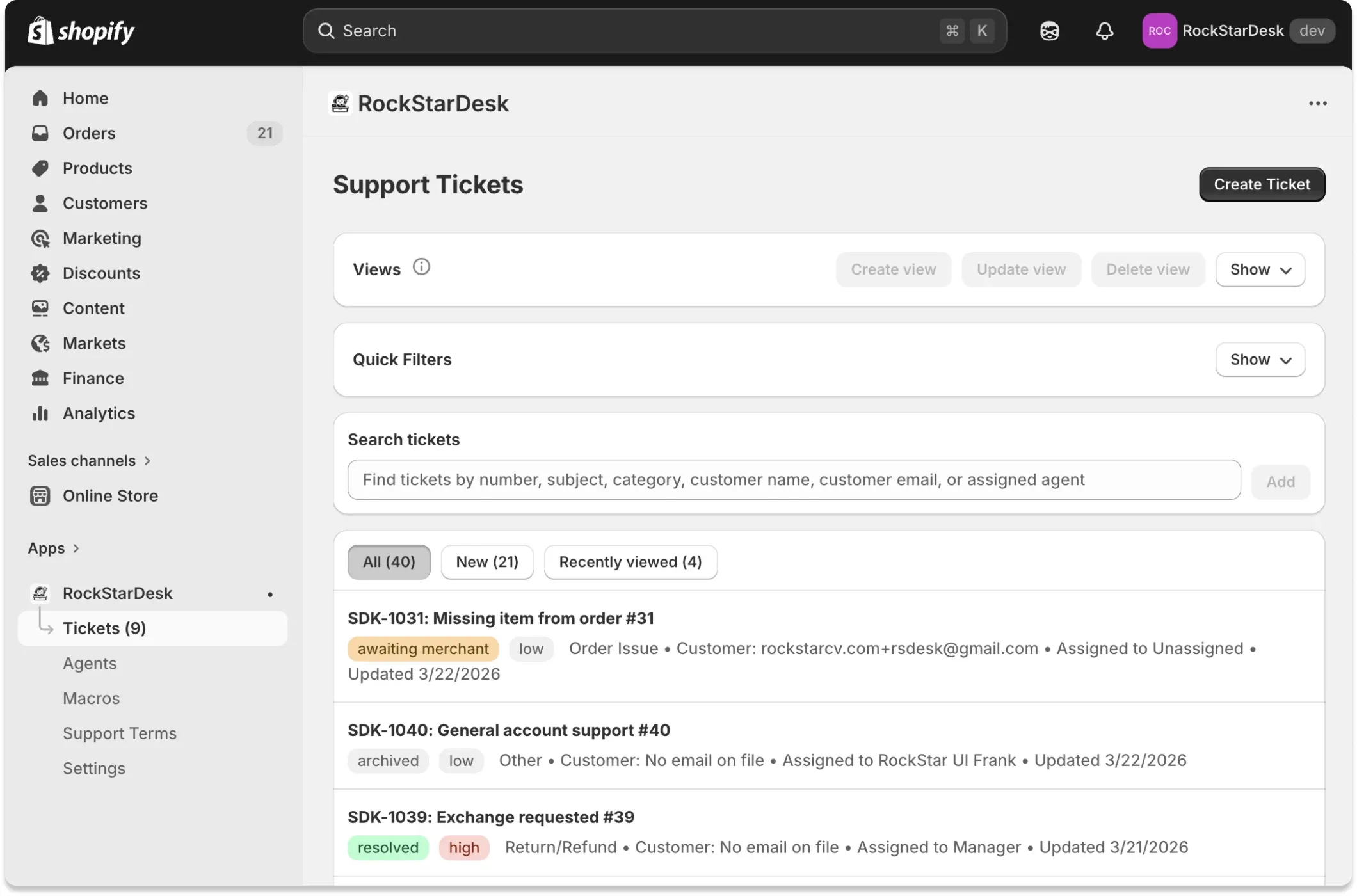
High level modes
Section titled “High level modes”- Inbox
- Url condition: Default /app/tickets
- Purpose: Browse and filter existing tickets.
- Create Ticket L2
- Url condition: mode=create
- Purpose: Create a ticket on behalf of a customer with explicit or automatic assignment.
Inbox features
Section titled “Inbox features”Views panel
Section titled “Views panel”- Description: Per-agent saved views that capture current filter state as JSON.
- Default option: Default view (empty id) resets to baseline filters.
- Persistence: View records are persisted in AgentTicketSavedView table per agent.
Actions
Section titled “Actions” - Create view - Update view - Delete view - Show/Hide panelGuardrails
Section titled “Guardrails” - Create only enabled when current filters differ from default snapshot. - Update only enabled when selected saved view has unsaved changes. - Duplicate view names are blocked per agent.Quick filters panel
Section titled “Quick filters panel”- Description: Fast multi-select filters over status and priority, plus unassigned and updated date range.
- Status behavior: Status chip list intentionally excludes ‘open’ from configured status options; other statuses appear with dynamic counts.
- Priority behavior: Multi-select priorities with dynamic counts.
- Unassigned: Dedicated chip toggles tickets where assignedAgentId is null.
- Date range: Shared ShopifyLikeDateRangePicker writes dateFrom/dateTo filters.
- Clear behavior: Clear quick filters resets status, priority, unassigned, date range, createdWithinHours and deselects saved view.
- Persistence: Panel Show/Hide state persisted in localStorage per browser profile.
Search tickets
Section titled “Search tickets”- Description: Tag-based search using accumulated tags instead of one-time query.
Match fields
Section titled “Match fields” - public ticket number - subject - category - source - assigned agent name - assigned agent email - customer name - customer email - customer external idBehavior
Section titled “Behavior” - Each entered token becomes a removable tag. - All tags are AND-matched (every tag must match). - Autocomplete suggestions are derived from existing ticket data.Tabs and pagination
Section titled “Tabs and pagination” - All - New - Recently viewed- New definition: Statuses awaiting_merchant and archived.
- Recent definition: Ticket ids stored in localStorage (max 50 recently opened).
- Page size: 20
- Pagination component: Polaris Pagination shown when total pages > 1.
Create ticket L2 features
Section titled “Create ticket L2 features”- Purpose: Allow agents/managers to open tickets for customers directly from admin.
Default values
Section titled “Default values”- Priority: Defaults to ‘high’ in UI when available; falls back to first configured priority.
- Category: Defaults to first configured category.
- Assignee: Automatic assignment (rules/default manager) unless explicitly selected.
Fields
Section titled “Fields”- **Subject** - **Required**: true - **Max length**: 160- **Category** - **Required**: true - **Source**: Configured category options from Settings- **Priority** - **Required**: true - **Source**: Configured priority options from Settings- **Customer search** - **Required**: true - **Behavior**: Live customer search starts after at least 2 characters.- **Customer** - **Required**: true - **Behavior**: Selection stores customerExternalId in hidden input- **Assign to agent** - **Required**: false - **Behavior**: Optional explicit override; otherwise assignment engine decides- **Linked order** - **Required**: Conditional - **Condition**: Required when selected category has requiresLinkedOrder=true- **Details** - **Required**: false - **Max length**: 6000On success
Section titled “On success”- Creates ticket with source=agent and status=open.- Determines assignedAgentId via explicit assignee or assignment rules/default manager fallback.- Attempts customer email notification with ticket details.- Redirects to ticket detail page with success notice or warning if email failed.Dashboard handoff behavior
Section titled “Dashboard handoff behavior”- Description: Dashboard links can pass agentId into /app/tickets.
- If agentId is __unassigned__, inbox toggles unassignedOnly=true.- If agentId is a real agent, that agent email/name is auto-appended as a search tag to preserve scoping.Permissions
Section titled “Permissions”- Required: Signed-in support staff profile
- If no agent profile exists, create-ticket and saved-view actions return 403.- Inbox view loading itself does not require special role permissions.Data outputs for store owner
Section titled “Data outputs for store owner”- Filtered ticket list with status/priority/category/customer/assignee metadata
- Quick filter chip counts calculated within current non-chip filters
- Saved views that can be reused after refresh
- Create-ticket errors returned inline with form values preserved
Configuration dependencies
Section titled “Configuration dependencies”- Ticket field options configured in Settings
- Assignment rules/default assignee configured in Settings
- Agents list in Agents page
- Store notification setup if owner expects customer emails on agent-created tickets
Common troubleshooting
Section titled “Common troubleshooting”- Create Ticket button disabled
- Cause: Required fields missing (subject/category/customer/priority, and linked order if category requires it).
- Fix: Complete required fields and ensure a customer is selected from search results.
- Customer not found in search
- Cause: Query shorter than 2 characters or no matching Shopify customer.
- Fix: Type at least 2 characters and search by name or email.
- View create/update unavailable
- Cause: No net change versus selected/default snapshot.
- Fix: Change filters first, then Create/Update view becomes enabled.