Customer Support Center (Storefront)
Rendering model
Section titled “Rendering model”- Technology: Server-rendered HTML/CSS/JS string from Remix loader
- Data bootstrap: window.SUPPORT_PORTAL payload (shop, customerId, orders, categories, termsUrl, apiBase)
- Data dependency: The support ticket service powers ticket creation and updates.
Entry requirements
Section titled “Entry requirements”- Customer identity: Requires logged_in_customer_id from app proxy context
- Shop context: Derived from app proxy session/shop query
- No customer behavior: Shows sign-in guidance instead of ticket UI
Ui sections
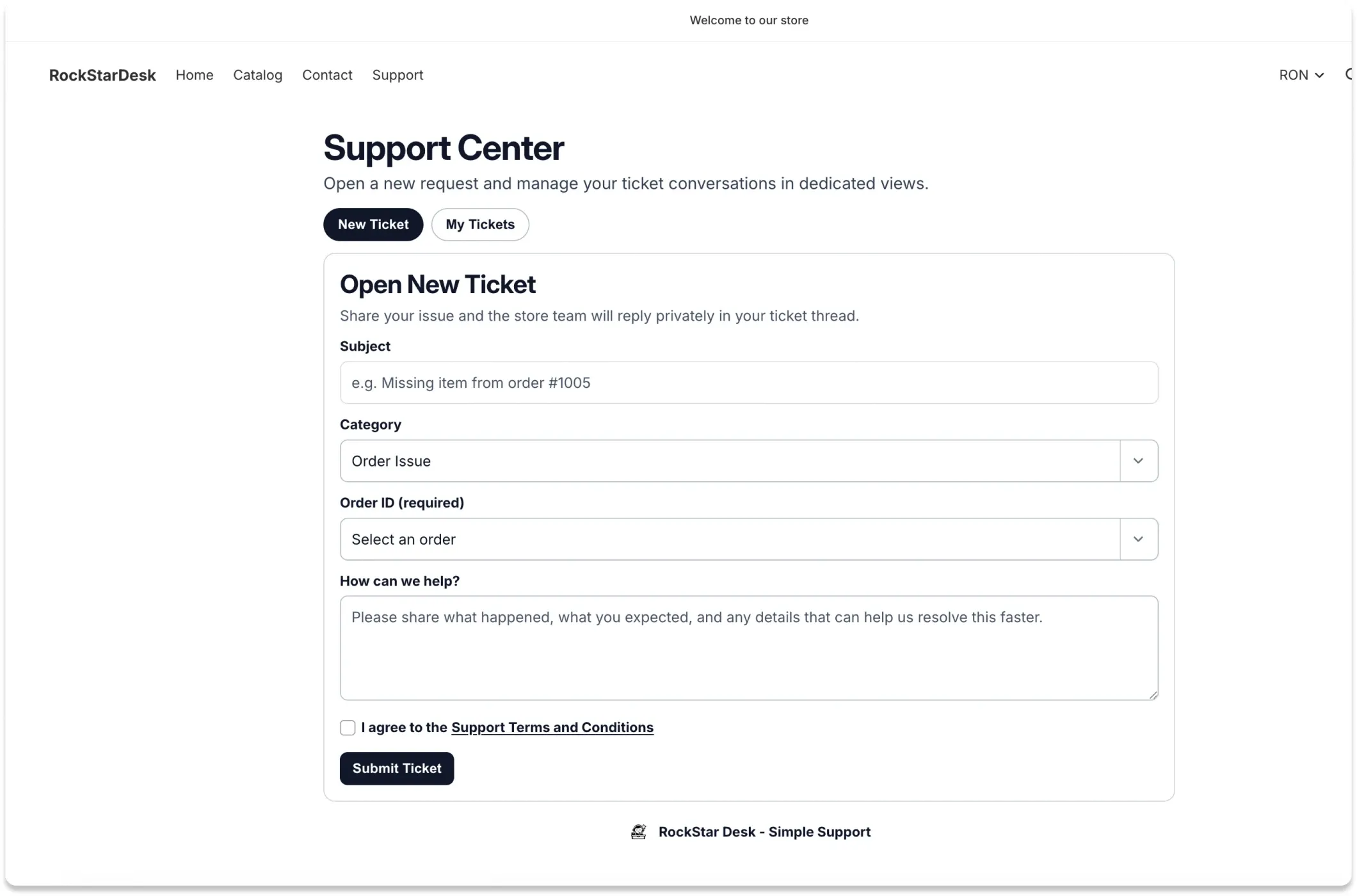
Section titled “Ui sections”- Header (Support Center title and subtitle)
- Two tabs: New Ticket / My Tickets
- Ticket creation form
- Ticket list and ticket detail conversation
- Brand footer link with app icon + text
New ticket tab
Section titled “New ticket tab”Fields
Section titled “Fields”- Subject (required)- Category (required, from Settings)- Order ID (required or optional by category requiresLinkedOrder)- Description (required)- Support Terms acceptance checkbox (required)Dynamic rules
Section titled “Dynamic rules”- Order requirement toggles live when category changes.- If customer has no orders and selected category requires order, submit is disabled with helper hint.- If customer is blocked from ticket submission, form shows block warning and submit is disabled.Submit behavior
Section titled “Submit behavior”- Ticket creation action- On success: form reset, tickets refresh, automatically opens new ticket detail- On error: inline alert messageMy tickets tab
Section titled “My tickets tab”- List mode: Shows non-archived tickets for current customer ordered by updatedAt desc.
- Detail mode: Shows single ticket thread with status badge and linked order info.
- Reply behavior: Customer replies are posted and the conversation refreshes automatically.
- Url sync: Tab and selected ticket are mirrored in URL query params (tab, ticket).
- Back navigation: Back to My Tickets returns detail view to list view.
Status and message rules
Section titled “Status and message rules”- Agent bubble style: Agent message cards use distinct support-team style.
- Customer visibility: Only public messages are shown to the customer.
- Archived exclusion: Archived tickets are excluded from customer list and detail views.
Emails and notifications
Section titled “Emails and notifications”- Customer received: Agent replies and agent-created tickets can trigger customer email notifications.
- Team received: Customer-created tickets and customer replies trigger team notification emails (BCC recipients from agents and account owners).
- Requirements: Store notification setup and deliverable recipient emails are required.
Menu automation
Section titled “Menu automation”- Customer account menu: Loader attempts to ensure Support link in customer account menu.
- Storefront main menu: Loader attempts to ensure Support link in storefront main menu.
- Legacy link migration: App shell services also migrate legacy support links to current proxy path.
Owner configuration dependencies
Section titled “Owner configuration dependencies”- Support Terms content in /app/terms
- Category list and requiresLinkedOrder flags in /app/settings
- Ticket assignment defaults/rules in /app/settings
- Store notification configuration for outgoing messages