Dashboard (Home)
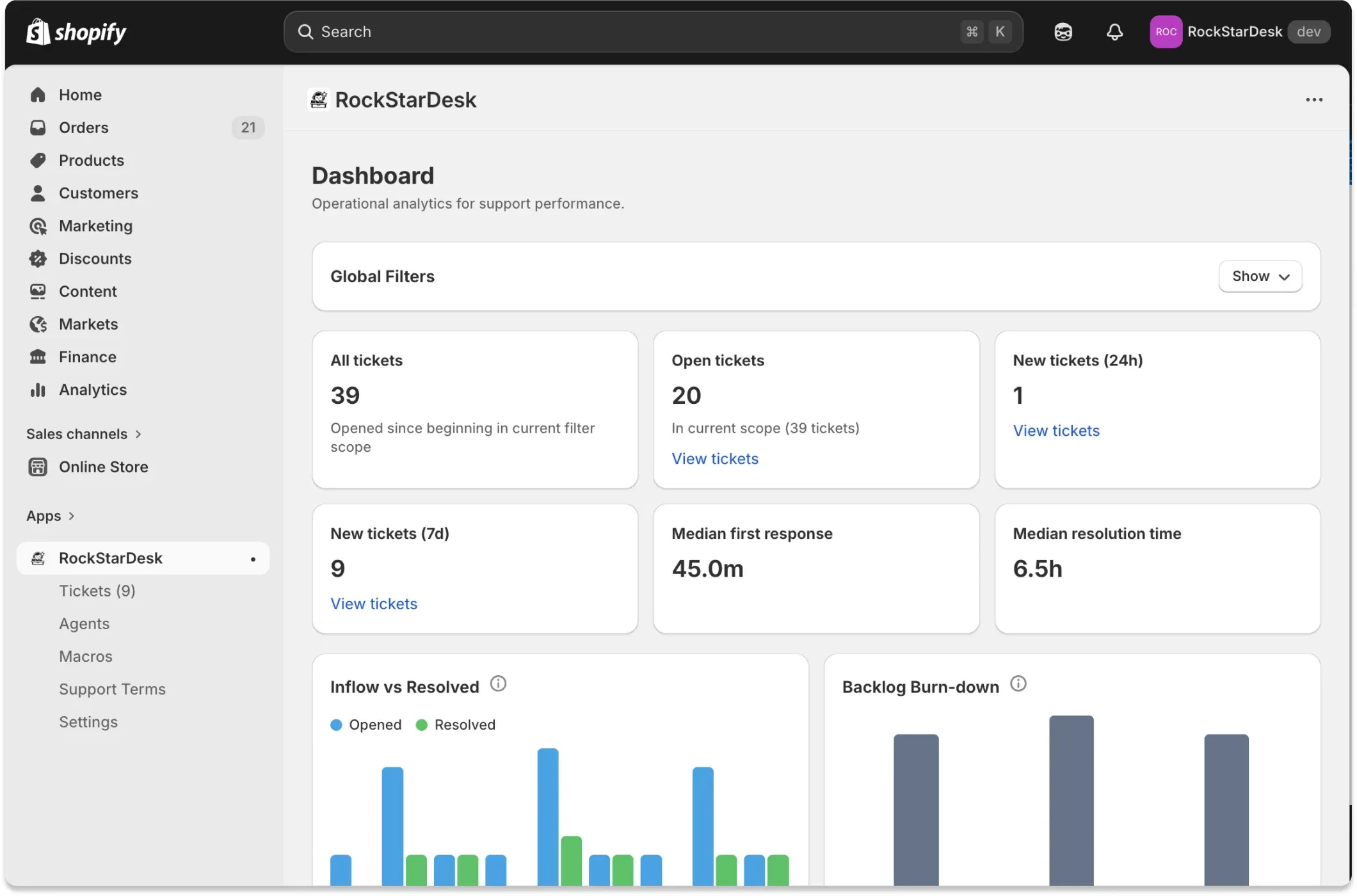
Page structure
Section titled “Page structure”- Global Filters (collapsible)
- KPI cards
- Inflow vs Resolved chart
- Backlog Burn-down chart
- Status Funnel
- Scope Summary
- Agent Performance table
Filters
Section titled “Filters”- Status: Single-select status filter. Supports all configured statuses plus ‘All statuses’.
- Priority: Single-select priority filter. Supports all configured priorities plus ‘All priorities’.
- Channel: Single-select source filter. Supports available sources and ‘All channels’.
- Category: Single-select category filter. Supports configured categories and ‘All categories’.
- Agent: Single-select assignee filter with options: all assignees, unassigned, each agent.
- Updated date range: Uses the shared Shopify-like date range popover and applies dateFrom/dateTo to ticket updatedAt.
- Default range: Last 30 days (today inclusive).
- All tickets
- Definition: Count of tickets in current filter scope and updated date range.
- Output: Number only (no drill link).
- Open tickets
- Definition: Count where status is open, awaiting_merchant, or awaiting_customer in current scope.
- Output: Number + link to /app/tickets with equivalent filters and matching statuses.
- New tickets (24h)
- Definition: Tickets created within the last 24 hours inside current scope.
- Output: Number + link to /app/tickets with createdWithinHours=24.
- New tickets (7d)
- Definition: Tickets created within the last 7 days inside current scope.
- Output: Number + link to /app/tickets with createdWithinHours=168.
- Median first response
- Definition: Median time from ticket createdAt to first public agent message.
- Output: Minutes or hours string (e.g., 18.0m, 2.3h).
- Median resolution time
- Definition: Median time from ticket createdAt to resolvedAt.
- Output: Hours string (or minutes for sub-hour values).
Charts
Section titled “Charts”- Inflow vs Resolved
- Series:
- Opened
- Resolved
- Bucket logic: Daily buckets for shorter ranges, weekly buckets when range length is large.
- Drill behavior: Clicking a bar links to /app/tickets with the bucket date range and inherited filters.
- Tooltip icon: Info icon explains metric intent.
- Series:
- Backlog Burn-down
- Series:
- Backlog (unresolved at bucket end)
- Drill behavior: Clicking a bar links to /app/tickets with open-only status filter for that bucket range.
- Tooltip icon: Info icon explains metric intent.
- Series:
Status funnel
Section titled “Status funnel”- Open needs agent: Count of open + awaiting_merchant in current scope.
- Awaiting customer: Count of awaiting_customer in current scope.
- Resolved: Count of resolved in current scope.
- Interaction: Each number is a link to filtered ticket inbox results.
Agent performance
Section titled “Agent performance”Columns
Section titled “Columns”- Agent- Current load- Resolved- Avg first response- Avg resolution- Drill down- Special row: Unassigned is included as a virtual row.
- Sorting: Sorted by current load desc, then resolved desc, then name asc.
- Interaction: Current load/resolved and View buttons open the ticket inbox with scoped filters.
Actions
Section titled “Actions”- Apply filters
- Method: GET
- Target: /app
- Output: Re-renders dashboard with selected filter query params.
- Reset
- Method: Navigation
- Target: /app
- Output: Clears all global filter query params and restores defaults.
Persistence and state
Section titled “Persistence and state”- Filter state source: URL query params
- Global filters collapsible default: Collapsed by default on first load
- Global filters collapsible persistence: Current code keeps this as component state only (not localStorage).
Permissions
Section titled “Permissions”- Required: Signed-in admin session
- Notes: No explicit per-permission gate in this page; data is scoped to the current shop.
Configuration dependencies
Section titled “Configuration dependencies”- Ticket field options (status, priority, category) from Settings
- Agents list for assignee filter
- Ticket sources from existing ticket rows
Common owner questions
Section titled “Common owner questions”- Why does a KPI number not match what I expect?
- Answer: All KPIs are constrained by current global filters and updated date range. Check whether status/priority/category/agent/date filters are active.
- Why are chart labels sparse?
- Answer: Tick labels are thinned for readability on long ranges; all buckets still exist and remain clickable.
- What does ‘Open tickets’ include?
- Answer: Open includes statuses open, awaiting_merchant, and awaiting_customer for this dashboard page.